


SimpliSafe Home Security App
4.516.30K Reviews
App Specs
- Version
- 8.2.0
- Updated On
- License
- Free
- Downloads
- 1,000,000+
- Developer
- SimpliSafe Home Security Systems
- Categories
- Lifestyle
- Platform
- Android, iOS
Screenshots
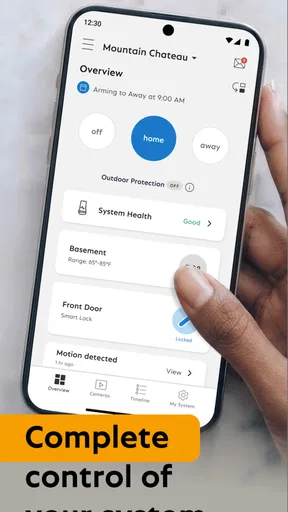
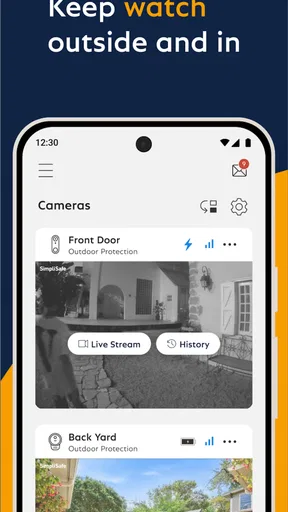
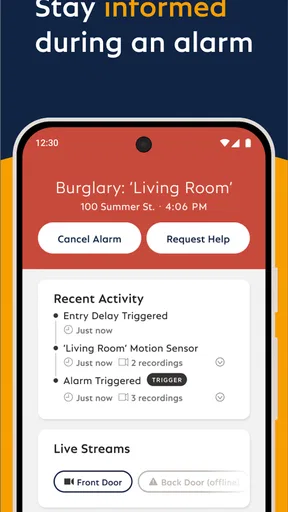
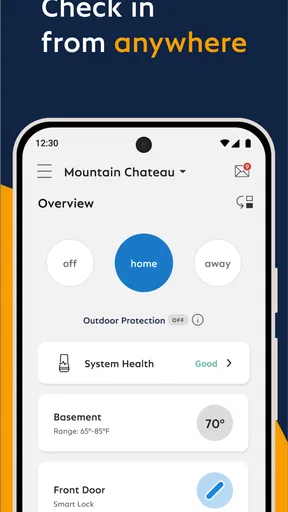
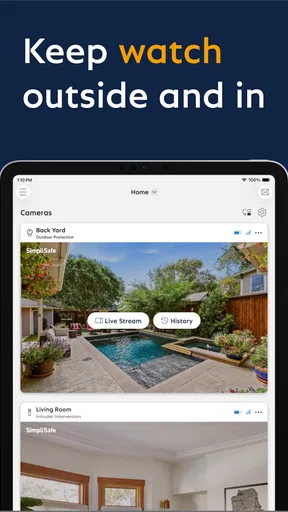
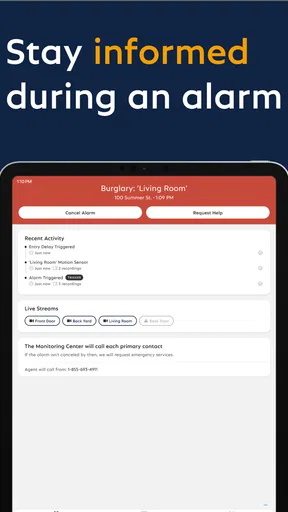
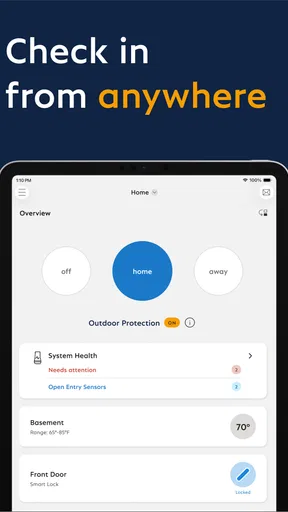
 Analysis by AppCompare
I found SimpliSafe Home Security App most useful when I treated it as the everyday control panel for a SimpliSafe wireless security system rather than as a standalone security product. That distinction matters: the app is only as helpful as the system it is connected to, the phone it runs on, and the network path between them. When those pieces line up, checking or managing a home security setup remotely feels straightforward. When they do not, the first instinct is often to blame the app even though the actual problem may be the phone, the connection, the system, or the account.
Developed by SimpliSafe Home Security Systems, this free Lifestyle app is aimed at people who already use, or are considering, the company’s wireless security equipment. It is available for Everyone, and the current version is 8.2.0 with a minimum operating system requirement of 12. That last detail is easy to overlook: anyone using an older phone or tablet should check compatibility before planning a setup around it.
My overall impression is positive, but practical rather than enthusiastic. The app’s value comes from reducing the need to interact directly with the physical security equipment every time I want to manage the system. It is especially convenient for people who travel, share responsibility for a home, or want to check the system without being on the property. It is less suitable for someone expecting a general-purpose smart-home dashboard or an app that can compensate for every hardware, account, or connectivity issue.
Where people usually get stuck
The most common frustration with a home-security app is not learning the main controls. It is getting through the moments around them: signing in on a new phone, connecting to the intended system, waiting for a status change, or deciding whether an apparent failure is temporary or important. SimpliSafe Home Security App feels most dependable when I approach those moments methodically instead of repeatedly tapping the same control.
A useful first question is whether the app is showing an outdated state or refusing to perform an action. Those are different problems. A delayed status can point toward a connection issue, while a sign-in or setup problem may concern the account or the phone. Closing and reopening the app can help with a temporary display problem, but it will not repair a missing account connection or a system that is offline.
Another point that catches people out is ownership and access. If several people use the same home security system, each person should be clear about which account or access arrangement they are using. A family member who can operate the system successfully on one phone may still have trouble after switching devices if the account details or permissions are not handled consistently. I would sort that out before testing the app in a hurry.
Remote control also changes the stakes compared with an ordinary Lifestyle app. If a screen seems slow, I do not keep issuing commands blindly. Repeated taps can make it harder to know which action actually went through. Instead, I pause, check the displayed state, and verify the physical system when I am able to do so. That habit is more important here than squeezing a few seconds out of the process.
Worth Reading Before You Choose

EA SPORTS FC Mobile 26 Is a Bigger Football Game, but It Takes Time

Flipboard Shows What News Apps Must Do Beyond the Feed

Switching to Android Auto Means Rethinking Your Driving Routine

Google Calendar Makes a Crowded Week Easier to Manage

Ludo King Makes the Most of the Minutes Between Plans

Baby Panda World Brings Quick Play to Modern Phones, but Its Game Library Feels Busy
Why the first use can feel less simple than expected
The store summary presents a clear idea: control a SimpliSafe wireless security system from anywhere in the world. In practice, “from anywhere” depends on the system being properly installed, the account being correctly connected, and the phone having a working route to the service. The app does not remove those dependencies. I see it as a remote interface, not a replacement for the underlying equipment or the account behind it.
That is also why this app is not a universal recommendation for every household. If you do not use SimpliSafe hardware, the app has little standalone value. If you want one application to combine equipment from several security brands, a broader smart-home platform may fit your habits better. The SimpliSafe app makes more sense when keeping the security system and its controls within one manufacturer’s ecosystem is a priority.
Setup checks that prevent avoidable trouble
Before judging the app, I would begin with the phone. The minimum operating system is 12, so an older device may be the first obstacle rather than the application itself. I would also make sure the phone has a stable internet connection and enough battery for the initial sign-in and testing process. A weak connection can make a working service appear unreliable, particularly when the screen is waiting for an updated system state.
Next, I would confirm that I am using the correct SimpliSafe account and that the intended security system is associated with it. This sounds obvious, but it is an important distinction when a household has moved, inherited equipment, or has more than one person managing the property. If the app opens but does not show the system I expect, I would investigate the account and system association before reinstalling anything.
During setup, I prefer to complete one step at a time and wait for visible confirmation. I would not switch repeatedly between the app and other screens while a connection or configuration action is still processing. If the app appears stuck, I would note what it was doing, wait briefly, and then restart the app once. That creates a cleaner test than pressing the same button several times.
It is also worth testing the system while standing near the equipment before relying on remote use. This separates two questions: whether the phone can communicate with the app and whether the installed security system is behaving correctly. A local test gives me a baseline. After that, I can try the same workflow away from home and identify whether the difficulty appears only with remote access.
For a shared household, I would perform the initial setup on the primary account first, then test the additional user’s phone separately. That avoids changing multiple variables at once. If the primary phone works and the second phone does not, the likely area to examine is the second account, device, or sign-in process rather than the physical security system.
A small preparation routine I actually recommend
- Update the phone to a supported operating system before beginning.
- Use a reliable connection during sign-in and the first system test.
- Confirm the correct account and intended home system.
- Test a control locally before depending on remote access.
- After an action, look for a changed status instead of tapping repeatedly.
This routine is not glamorous, but it prevents a surprising amount of confusion. It also gives the user useful information if support is needed later: whether the issue occurs on one phone, one connection, one account, or the system itself.
Recovering a workflow when something appears to fail
When the app does not respond as expected, I use a gradual recovery process. First, I check whether the phone itself is online and whether other ordinary internet functions work. Then I close and reopen the app. If the problem is limited to a stale screen, that may be enough. If the same issue remains, I sign out and back in only when I am confident I know the account details, because signing out can create extra friction if those details are not readily available.
I avoid uninstalling the app as an automatic fix. Reinstallation can clear local problems, but it also adds another setup step and does not solve issues involving the account, the security system, or the network service. I would reserve it for a repeatable app-specific problem after simpler checks have failed. Before doing so, I would make sure I understand how I will sign in again.
One of the most useful habits is recording the exact sequence that produced the problem. “It does not work” is difficult to diagnose. “The app opens, shows the account, but the system state does not update after I switch connections” is much more useful. I would note whether the issue happens every time, only on one device, or only away from home. That information helps distinguish a display glitch from a communication failure.
If an action appears to have succeeded but the screen does not change, I wait and verify rather than immediately repeating it. With security controls, uncertainty is more important than speed. If I am at home, I can compare the app’s state with the physical system. If I am away, I would avoid assuming that a delayed screen means the command definitely failed or definitely succeeded. I would use the clearest available status and follow the official support route when the result remains ambiguous.
There is a practical trade-off here. The app makes remote management convenient, but remote convenience can encourage overconfidence. I would not use a single screen refresh as proof that every part of the property is protected. The app is a tool for interacting with the SimpliSafe system; it is not a substitute for sensible installation, routine checks, and knowing what the physical equipment is doing.
Three less obvious ways to make the app easier to live with
First, I would choose one phone as the reference device during setup. Testing on several phones at once makes it difficult to tell whether a problem belongs to the app, the account, or a particular device. Once the primary workflow is stable, adding other household phones becomes much easier.
Second, I would test remote access before a trip rather than on the day I leave. A local connection can hide a problem that only appears when the phone uses a different network. A short test away from home gives me time to correct account or device issues without the pressure of being unavailable.
Third, I would treat status verification as part of every important action. Instead of thinking “I pressed the control, so the job is done,” I look for the resulting state and, when practical, compare it with the system itself. This is a small workflow change, but it is more valuable than repeatedly restarting the phone whenever something feels uncertain.
When the app is not the real cause
Security apps sit at the end of a chain. The phone needs a supported operating system and a working connection. The account needs to identify the right system. The SimpliSafe equipment needs to be installed and communicating properly. The service connecting those pieces also needs to be available. If any link is weak, the app may be the only visible place where the problem appears.
For example, if the app works normally on one phone but not another, I would investigate the second phone before assuming the whole service is down. If the app behaves the same way on multiple phones and networks, the issue may be broader than one installation. If local interaction with the equipment is also unreliable, reinstalling the mobile app is unlikely to be the first sensible move.
This is where the app compares favorably with improvised alternatives but less favorably with a carefully integrated multi-brand setup. Compared with relying on a browser, text messages, or separate hardware controls, a dedicated application is more convenient for regular interaction with the SimpliSafe system. On the other hand, a household that already uses a different smart-home platform may prefer a single place for cameras, locks, lights, and security. The SimpliSafe app is focused, and that focus is either a strength or a limitation depending on what you own.
I also would not choose it solely because it is free. The app itself has no purchase price, but its usefulness depends on having the compatible SimpliSafe security setup and being comfortable with that ecosystem. “Free” describes the download, not a promise that it can replace a complete security installation. For an existing SimpliSafe customer, that is a sensible arrangement. For someone starting from scratch, the wider equipment and service decision matters more than the app price.
The app’s public reception is encouraging: it holds a 4.5 average from around 33 thousand ratings, with over 16 thousand written reviews and more than 1 million installs. Those figures suggest that it has reached a substantial audience and that many users find it useful, but they do not remove the setup considerations I have described. A popular app can still be a poor fit for an unsupported phone, an incorrectly linked account, or a household seeking broad cross-brand control.
Who should use it, and who should look elsewhere?
I would recommend it to an existing SimpliSafe customer who wants a practical way to manage the wireless security system while away from home. It is also a good match for households where more than one trusted person needs access, provided the account arrangement is kept clear and each phone is tested separately. People who travel or regularly check a property remotely are likely to appreciate the convenience more than someone who rarely changes or checks the system.
I would be more cautious about recommending it to someone who has not chosen security hardware yet. That person should compare complete systems, not just mobile interfaces. I would also point people toward a different option if their main goal is one unified control center for equipment from many manufacturers. The focused SimpliSafe approach may feel restrictive in that situation.
It is not ideal for anyone who expects the app to diagnose hardware problems automatically or to make an unreliable internet connection irrelevant. The app can simplify control, but it cannot guarantee that every remote action will be immediate or that every status message reflects a problem in the app itself. Users who need highly specialized integrations should also examine whether the SimpliSafe ecosystem matches their existing setup before committing.
My practical verdict after using it
SimpliSafe Home Security App succeeds because it keeps the central task clear: interacting with a SimpliSafe wireless security system without needing to be physically beside it. I like that focused purpose. The app is easier to justify when I think of it as part of a complete SimpliSafe arrangement, not as a general lifestyle download that happens to include security controls.
The main friction is not the idea of remote control; it is the chain of dependencies around it. Supported software, the right account, a stable connection, a correctly functioning system, and careful status checking all matter. Once I accepted that, the troubleshooting process became much more predictable. I could identify whether I was dealing with a stale screen, a phone problem, an account mismatch, a network issue, or a system-level concern instead of treating every delay as an app failure.
With an average rating of 4.5 and a broad installed audience, it is clearly a well-established choice in its niche. I would still judge it by fit rather than popularity. If you already use SimpliSafe equipment and want remote access in a dedicated app, this is a sensible, free companion for everyday security management. If you want a brand-neutral smart-home hub, use older hardware that cannot meet the operating-system requirement, or need the app to solve problems outside its control, another direction may serve you better.
My advice is to install it before you genuinely need it, complete a local test, try the workflow from another network, and keep your first troubleshooting steps simple. That preparation reveals the real strengths and limits of the app while there is still time to correct them. Used with those expectations, it feels less like a source of mystery and more like what it should be: a convenient remote interface for the SimpliSafe system you already rely on.
Pros
- Live video lets you check your home remotely.
- Custom alerts help you respond quickly to unusual activity.
- Works with SimpliSafe cameras
- sensors
- and alarm systems.
- Remote arming and disarming is convenient when away.
- Clear event history makes it easier to review recent activity.
Cons
- Many features require a paid SimpliSafe monitoring plan.
- Performance depends on a reliable internet connection.
- Some advanced controls require compatible SimpliSafe hardware.
- Camera recordings may use significant mobile data.
- Occasional delays can occur when loading live video or alerts.
FAQs for SimpliSafe Home Security App
What is the SimpliSafe Home Security app used for?
The SimpliSafe Home Security app works as the control center for a compatible SimpliSafe alarm system. From the app, you can arm or disarm the system, check sensor activity, view alerts, manage cameras, and review certain event information. It is designed to let you monitor and manage your home security remotely, although the available features depend on the equipment installed and the service plan connected to your account.
Do I need SimpliSafe equipment or a subscription to use the app?
Yes, the app is primarily intended for owners of a SimpliSafe home security system. You generally need a SimpliSafe account and compatible hardware, such as a base station, entry sensors, motion sensors, or cameras, to use its main functions. Some remote-control, monitoring, video, and alert features may also require a paid subscription. Before downloading, check the current plan requirements and device compatibility for your region.
Can I monitor my home remotely with the SimpliSafe app?
The app allows users to manage many security functions while away from home, provided the system is connected to the internet and properly configured. You can typically check the system status, receive notifications, and arm or disarm the alarm remotely. Camera viewing and other advanced monitoring tools may depend on the camera model, network connection, subscription level, and the permissions enabled in your account.
Does the SimpliSafe app support security cameras and video recording?
Support for cameras is available when compatible SimpliSafe cameras are linked to the account. Depending on the model and subscription, the app may let you view live video, receive motion notifications, and access recorded clips or event history. Video performance depends heavily on your home internet connection, lighting, and camera placement. Storage and recording options can vary, so review the current plan details before relying on them.
Is the SimpliSafe Home Security app reliable and easy to use?
The app is generally straightforward for everyday tasks, with controls organized around system status, alerts, sensors, and cameras. However, the experience can be affected by internet outages, phone permissions, outdated software, or delays between a sensor event and the notification. It should be treated as a companion to the physical alarm system rather than the only safety measure. Keep emergency contacts and backup procedures available in case the app or network is unavailable.


